



How to Hide the Admin Bar on the Frontend with JetHost Total Care
When you’re logged in, WordPress shows a black admin bar across the top of your site’s front end. The Hide admin bar in website frontend option in JetHost Total Care removes it, giving you a clean view of your site as visitors see it, on any JetHost WordPress hosting plan.
Hide the admin bar
- In your WordPress dashboard, open JetHost Total Care → Admin Enhancements.
- Toggle on Hide admin bar in website frontend.
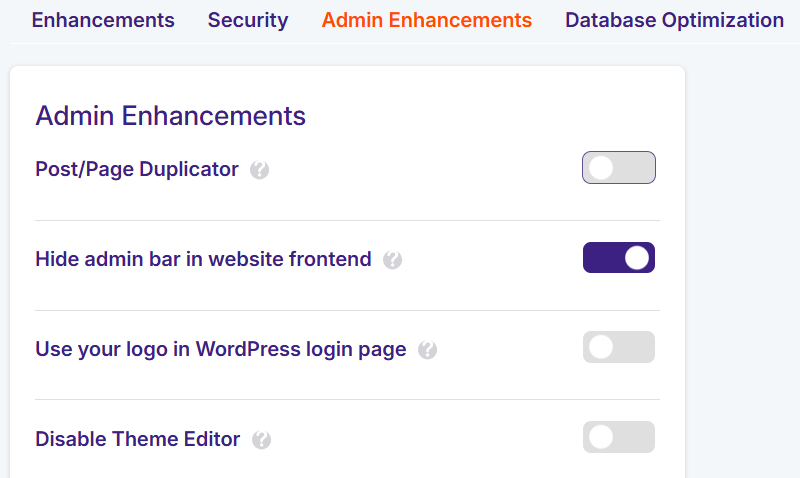
With it on, the admin bar no longer appears on the front end for logged-in users. It only affects the front of the site – your dashboard and the admin bar inside wp-admin stay exactly as they are, so you can still manage everything normally.
Why hide it
The admin bar can get in the way when you’re checking how a page really looks, especially near the top of the design or on mobile, where it can overlap your header. Hiding it lets you preview your site the way your visitors experience it, without logging out. It doesn’t log anyone out and changes nothing in the dashboard, so you can toggle it back on any time you want the bar’s quick shortcuts.
What the admin bar is
The admin bar is the dark toolbar WordPress shows across the top of the screen when you’re logged in. It gives quick links to the dashboard, to edit the current page, to clear caches, and more. Visitors who aren’t logged in never see it – it only appears for you and other logged-in users, and only this setting controls whether it shows on the front end of the site.
Cleaner previews and testing
The main reason to hide it is to see your site exactly as visitors do. The bar sits over the very top of the page, so it can hide a sticky header or overlap your design, especially on mobile – which makes it hard to judge spacing and layout. Turning it off gives you a true preview without logging out. It changes nothing in the WordPress dashboard and doesn’t affect your visitors’ experience, since they never saw the bar anyway; it’s purely a convenience for how you review and fine-tune your own pages.
Need More Help?
Admin bar still showing after enabling this? Try clearing your cache, or reach out and we’ll help.













