



How to Fill and Upload Form W-8BEN-E (For Non-US Entities)
If your affiliate account is registered under a company name (not an individual) and that company is based outside of the United States, you are required to submit Form W-8BEN-E.
Note: Individuals should use Form W-8BEN. US Entities/Citizens must use Form W-9.
This form is significantly longer than the individual version, but most affiliate partners only need to complete a few specific sections. Please follow the guide below.
Step 1: Download the Form and Instructions
You must use the official form provided by the IRS.
Step 2: How to Fill Out the Form
Note: The W-8BEN-E is 8 pages long, but you only need to fill out the parts relevant to your business status. For most operating businesses (affiliates), this involves Part I, Part III, Part XXV, and Part XXX.
Part I: Identification of Beneficial Owner
- Line 1 (Name of organization): State the full legal name of your company. This must match your JetHost Affiliate profile.
- Line 2 (Country of incorporation): Indicate the country where your company is registered.
- Line 4 (Chapter 3 Status): Mark the box that describes your entity (e.g., Corporation).
- Line 5 (Chapter 4 Status – FATCA): This is the most complex part.
- Common Scenario: If you are a standard operating business (providing services/marketing) and not a financial institution or investment fund, the most common status is Active NFFE (Active Non-Financial Foreign Entity).
- If you select “Active NFFE,” you must also check the box for “Complete Part XXV”.
- If you are unsure of your status, please consult the IRS instructions or a tax advisor.
- Line 6 (Permanent residence address): Enter your company’s registered address. This must match the address in your JetHost profile.
- Line 9b (Foreign Tax Identifying Number): Supply the tax ID number issued to your company by your local government (e.g., VAT number or Company Registration number acting as a Tax ID). This is required to claim treaty benefits.
Part III: Claim of Tax Treaty Benefits
Complete this section if your company is in a country with a US tax treaty (to avoid 30% withholding).
- Line 14a: Check the box and enter your country of residence.
- Line 14b: Check the box. You may need to select the limitation on benefits provision that applies to you (e.g., “Company that meets the ownership and base erosion test” or “Company with an item of income that meets active trade or business test”).
Part XXV: Active NFFE
- Line 39: If you selected “Active NFFE” in Line 5, check the box in this section to certify that your company is an active business (less than 50% of gross income is passive income like interest/dividends).
Part XXX: Certification
- Sign Here: Authorized signature of the company representative.
- Print Name: Print the name of the signer.
- Date: Enter the date of signing (MM-DD-YYYY).
- Check the box: “I certify that I have the capacity to sign for the entity…”
Step 3: Upload the Form to JetHost
Once your form is completed and saved, follow these steps to upload it to your profile.
- Log in to your JetHost Affiliate Panel:
https://affiliates.jethost.com/affiliates/login.php#login
- Navigate to My Profile.
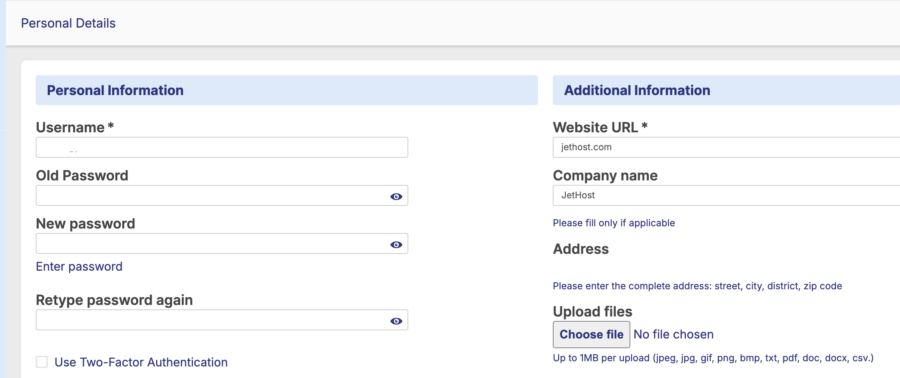
- Scroll down to the Additional Information section (located on the right side of the screen).
- Locate the Upload files area at the bottom of that section.
- Click the Choose file button.
- Select your completed W-8BEN-E file from your computer.
- Supported formats: jpeg, jpg, gif, png, bmp, txt, pdf, doc, docx, csv.
- File size limit: Maximum 1MB.
- Once the file is selected, scroll to the bottom of the page and click the Save Changes button.
Disclaimer: JetHost does not provide tax advice. The “Active NFFE” status mentioned above is a common scenario for affiliate businesses but may not apply to every entity. Please consult a qualified professional to ensure you select the correct Chapter 4 status.










