



How to Fill and Upload Form W-8BEN (For Non-US Affiliates)
If you are a JetHost affiliate based outside of the United States, you are required to submit a Form W-8BEN (Certificate of Foreign Status of Beneficial Owner for United States Tax Withholding).
This form certifies that you are not a U.S. person and allows you to claim a reduced rate of tax withholding if your country has a tax treaty with the U.S.
Note: If you are a US citizen or US resident alien, do not use this form. You must submit a Form W-9 instead.
Step 1: Download the Form and Instructions
You must use the official form provided by the Internal Revenue Service (IRS).
Step 2: How to Fill Out the Form
Please follow the instructions below, which are based on the official IRS guidelines. You may fill the form out digitally or print it and fill it out with a black pen.
Part I: Identification of Beneficial Owner
- Line 1 (Name of individual): Input your full legal name. This must match the name on your JetHost Affiliate account.
- Line 2 (Country of citizenship): Specify the country where you are a citizen.
- Line 3 (Permanent residence address): Provide your permanent address.
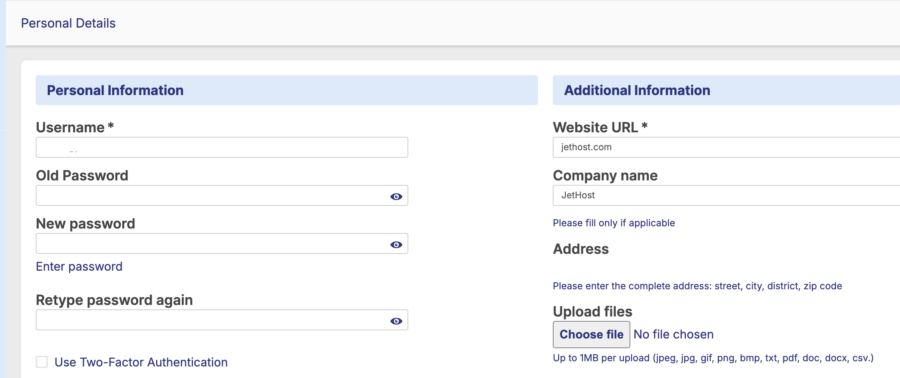
- Important: This address should match the address in your JetHost profile (Under “Personal Details” > “Address”).
- Note: Do not use a P.O. Box or “in-care-of” address unless it is your registered legal address.
- Line 4 (Mailing address): List your mailing address only if it is different from the address in Line 3.
- Line 5 (U.S. taxpayer identification number): If you have a U.S. Social Security Number (SSN) or ITIN, enter it here. If you do not have one, leave this blank.
- Line 6a (Foreign tax identifying number): Type the Tax Identification Number (TIN) issued to you by your country of residence (e.g., your local tax ID).
- Note: This is required to claim tax treaty benefits.
- Line 6b: Check this box only if you do not have a Tax ID number.
- Line 7 (Reference number): (Optional) You may enter your affiliate email here to help us identify your account quickly.
- Line 8 (Date of birth): Enter your birth date in the U.S. format: MM-DD-YYYY (Month-Day-Year).
Part II: Claim of Tax Treaty Benefits
- Line 9: You should complete this section if your country of residence has a tax treaty with the United States and you wish to claim a reduced rate of withholding tax.
- 9a: Check the box and enter your country of residence.
- Note: If you are unsure if your country has a treaty with the US, please refer to the IRS Tax Treaty Tables or consult a tax professional.
Part III: Certification
- Sign Here: The form must be signed by the beneficial owner (you).
- Date: Enter the date you signed the form (Format: MM-DD-YYYY).
- Print Name: Clearly print your full name exactly as it appears in Line 1.
Step 3: Upload the Form to JetHost
Once your form is completed and saved, follow these steps to upload it to your JetHost Affiliate Panel.
- Log in to your JetHost Affiliate Panel:
https://affiliates.jethost.com/affiliates/login.php#login
- Navigate to My Profile.
- Scroll down to the Additional Information section (located on the right side of the screen).
- Locate the Upload files area at the bottom of that section.
- Click the Choose file button.
- Select your completed W-8BEN file from your device.
- Supported formats: jpeg, jpg, gif, png, bmp, txt, pdf, doc, docx, csv.
- File size limit: Maximum 1MB.
- Once the file is selected, scroll to the bottom of the page and click the Save Changes button.
Disclaimer: JetHost is not a tax advisor. The information provided above is based on IRS instructions to assist you with the process. If you have specific questions regarding your tax status or how to complete the form, please consult a qualified tax professional.










