If you’re already using JetHost WP Manager, you know how convenient it is to manage your WordPress site from one place – plugins, themes, backups, staging environments, updates, users, and more. Now, there’s an even easier way to handle all of it.
We’ve integrated WP Manager with JetHost MCP, so you can simply tell your AI assistant what you’d like to do with your website. For example, “Update all my plugins and clear the cache,” “Create a staging copy of my site,” or even “Install a new WordPress site for me.”
We’ve integrated WP Manager with JetHost MCP, so you can simply tell your AI assistant what you’d like to do with your website. For example, “Update all my plugins and clear the cache,” “Create a staging copy of my site,” or even “Install a new WordPress site for me.”
What Can You Do with This Integration?
The integration supports the actions you’d normally perform through WP Manager. Instead of navigating through your client area’s menus and settings, you can simply ask your AI assistant to handle them in a regular conversation.
Here’s what you can do:
And we’re not stopping here. As JetHost MCP continues to evolve, we’ll keep expanding the range of actions you can perform directly through your AI assistant.
To make things even easier, you’ll also find ready-to-use example prompts in the WP Manager section of your JetHost client area.
Don’t see WP Manager in your client area, even though you have a WordPress website? Get in touch with our team, and we’ll enable it for you at no extra cost.
From “Install WordPress” to a Website Ready to Build On
One of the best things about this integration is that you don’t need to know the name of every setting or which menu to navigate to. You could say something like:
“Install a new WordPress site on my hosting, activate a popular eCommerce theme and all the required plugins for an online store. Create a subdomain. I’ll be selling books.”
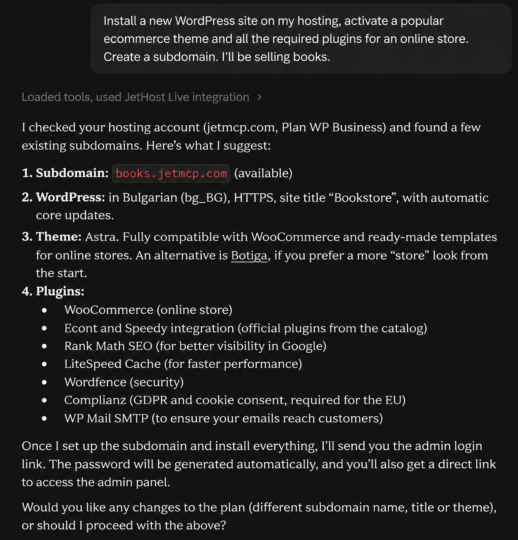
Your AI assistant can check your available hosting services, suggest a suitable configuration, and prepare the necessary steps. If an action requires your approval or additional information, it’ll ask before proceeding.
Instead of breaking down your request into individual technical tasks, you can start with what you’re actually trying to achieve and work through the details in a natural conversation.
You Stay in Control
Just because your AI assistant can manage your WordPress website doesn’t mean it has unrestricted access to everything. JetHost MCP only works with the websites and resources you’ve granted it access to, and all actions are logged. Sensitive operations, such as deleting or publishing content, require your confirmation before they can be executed.
This means you can use AI to handle everyday website management tasks without losing control over what actually changes.
How to Get Started
If you’re already using JetHost MCP, the new WordPress management capabilities are available through your existing AI assistant connection.
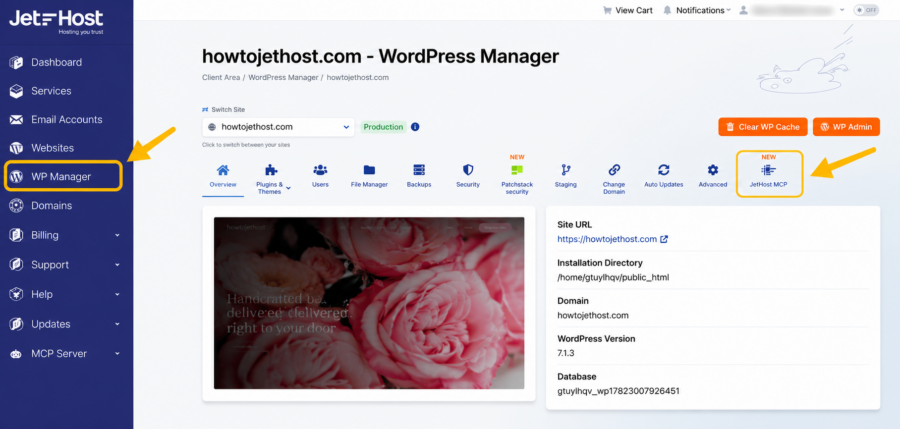
Log in to your JetHost client area → WP Manager → select your WordPress website → JetHost MCP.
There, you’ll find your connection status, example prompts, and direct access to instructions for connecting your AI assistant to your JetHost account.
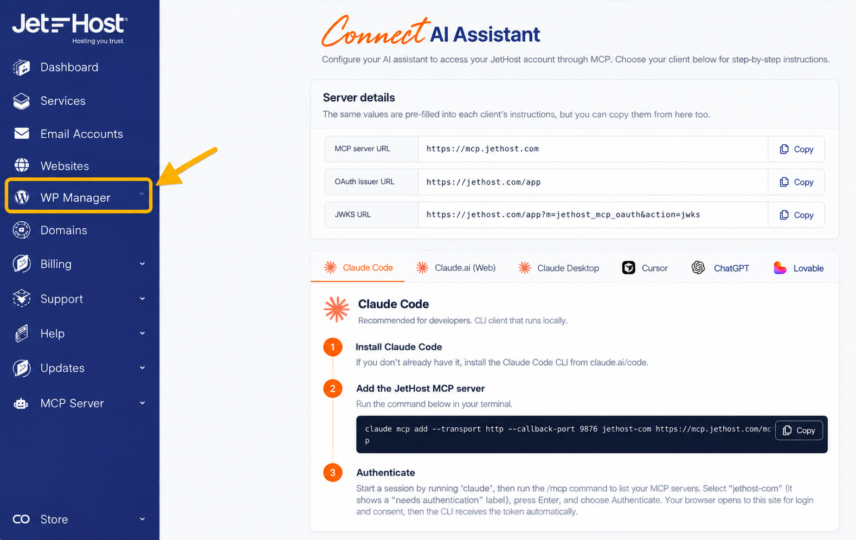
If you haven’t connected ChatGPT, Claude, or another compatible AI assistant to JetHost MCP yet, you can do so directly from your client area.
You can now manage your WordPress website through a simple conversation. Just say what you want to do, and let
jethost.com handle the steps needed to get it done.


Top articles
Our Picks
- 6 minutes read
7 Signs It’s Time to Switch Your Web Hosting Provider
Most people don’t think about their hosting until something breaks. But if your website has been acting up – slower pages, random errors, or unreliable support – it might be…
- 4 minutes read
eDesign Interactive on Pressure, People & Creativity
Client: George, CEO of eDesign Interactive Industry: Web Design, Digital Strategy & Interactive Marketing Website: edesigninteractive.com Relationship: Long-time collaboration with the team behind JetHost
- 2 minutes read
Case Study: How SEO Rush Got 5x Faster with JetHost
Client: SEORUSH Industry: SEO & Digital Marketing Website: seorush.org Service: JetHost WordPress Hosting When you run an SEO agency, your website needs to perform as well as the results you…
Related Posts
 3 minutes read
Meet the JetHost DNS Manager: DNS Without the Headache
DNS is one of those things nobody thinks about until it breaks. Then it is the only thing anyone thinks about. For a long time, changing DNS at JetHost meant…

- 5 minutes read
JetHost VPS: Built for Performance
Just a short time ago WordPress security used to feel almost straightforward – installing a security plugin and using a strong password etc used to be enough. Currently we are…
 7 minutes read
Manage Your Hosting with a Single Prompt: Meet the JetHost MCP Server
Just a short time ago WordPress security used to feel almost straightforward – installing a security plugin and using a strong password etc used to be enough. Currently we are…