



How to Limit Login Attempts with JetHost Total Care
Brute-force attacks try thousands of password guesses against your login page. The Limit Login Attempts option in JetHost Total Care blocks that by locking out repeated failed logins. This guide shows how to turn it on, on any JetHost WordPress hosting plan.
Enable login-attempt limits
- In your WordPress dashboard, open JetHost Total Care → Security.
- Find Limit Login Attempts in the Security Options list.
- Toggle it on to start protecting your login page.
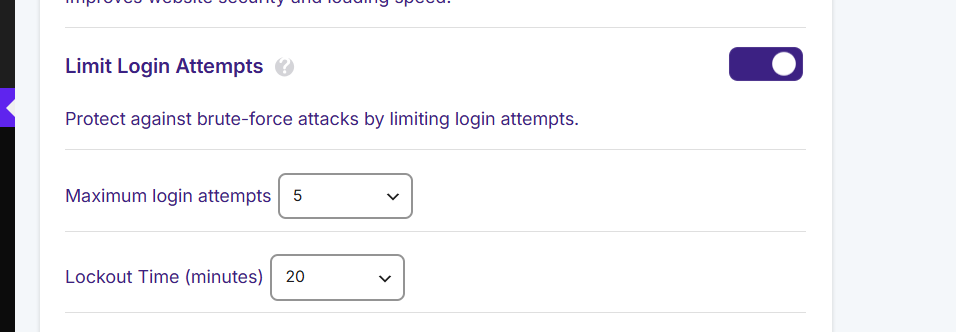
Once enabled, an IP that fails to log in too many times in a row is temporarily blocked. This makes automated password-guessing impractical, because the attacker is stopped long before working through a password list.
Why it matters
The WordPress login page is the most common target on any site. Without a limit, bots can try endless combinations around the clock. Limiting attempts is one of the single most effective security steps you can take, and it works quietly in the background with no effect on normal visitors – the limit only ever applies to failed logins. For the strongest protection, pair it with a changed login URL and a strong, unique administrator password.
Why brute-force attacks work
Out of the box, WordPress puts no limit on how many times someone can try to log in. That means an automated bot can submit thousands of username and password combinations against your login page, around the clock, until it guesses right. These attacks are constant and automated – almost every WordPress site sees them – and they also waste server resources while they run. Limiting login attempts removes the opportunity by locking out an IP after a few failures.
Part of a hardened, faster WordPress
Login limiting is one layer of good WordPress security, and it works best alongside others. Use a strong, unique administrator password, change your login URL so bots can’t find the page, and keep WordPress, themes, and plugins updated. There’s a performance benefit too: blocking repeated bot logins means fewer wasted requests hitting your server, which helps keep the site responsive for real visitors. None of this affects your own login as long as you enter the right password.
JetHost Experts Tip
Locked yourself out by mistake? The block is temporary and clears on its own after a short wait. If you need back in sooner, contact us with your IP and we’ll clear the lockout.
Need More Help?
Still seeing login attacks, or locked out? Reach out and our team will help.













