



How to Add Your Logo to the WordPress Login Page with JetHost Total Care
The WordPress login page shows the WordPress logo by default. With JetHost Total Care you can replace it with your own, so the login screen matches your brand. This guide shows how to use the Use your logo in WordPress login page option.
Add your logo
- In your WordPress dashboard, open JetHost Total Care → Admin Enhancements.
- Toggle on Use your logo in WordPress login page.
- Select or upload the logo image you want to use, and save.
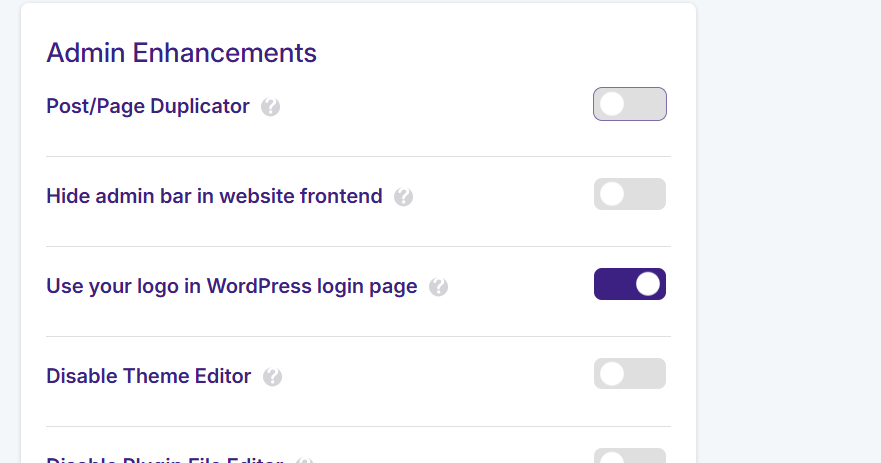
Your logo now appears above the login form in place of the WordPress one. It’s a small touch that makes the login screen feel like part of your brand – useful for client sites and anywhere other people log in, on any JetHost WordPress hosting plan.
Pick the right image
Use a clear logo on a transparent background (a PNG works well) so it sits neatly above the form. A very large image may be scaled down, so a simple, balanced logo looks best. The change only affects the login screen, so it won’t interfere with your theme or header. If you also set custom login and logout redirects, the whole login experience can match your brand from start to finish.
Why brand the login page?
By default the WordPress login screen shows the WordPress logo, which links back to wordpress.org. For a business or client site that’s a small but visible detail that doesn’t match your brand. Replacing it with your own logo makes the login page feel like part of your site – more professional and reassuring for anyone who logs in, whether that’s you, your team, or a client. It’s one of those finishing touches people notice immediately.
Keep the logo lightweight
Because the logo loads on the login page, use a properly sized, optimized file so the page stays fast. A compressed PNG with a transparent background works well, and an SVG is even better – it stays razor-sharp at any size while keeping the file tiny. Avoid uploading a huge image and letting the browser scale it down, which only wastes bandwidth. Pair this with custom login and logout redirects to make the whole sign-in journey match your brand from start to finish.
JetHost Experts Tip
Building sites for clients? A branded login page is an easy, professional detail they notice immediately – and it takes less than a minute to set up here.
Need More Help?
Logo not appearing or looking stretched? Reach out and our team will help.













