



How to increase my mailbox quota?
Is a mailbox full and bouncing new messages? You can raise its storage quota in cPanel in under a minute. This guide shows how to increase a mailbox’s limit, and what to do when the whole account is running out of space. Email is included with every JetHost web hosting plan.
Increase a mailbox quota
- Log in to cPanel and open Email Accounts under the Email section.
- Find the address you want and click Manage next to it.
- Scroll to Storage Space (also called Allocation).
- Enter a higher limit in MB, or choose Unlimited to let the mailbox use whatever space the account has.
- Click Update Email Settings to save.
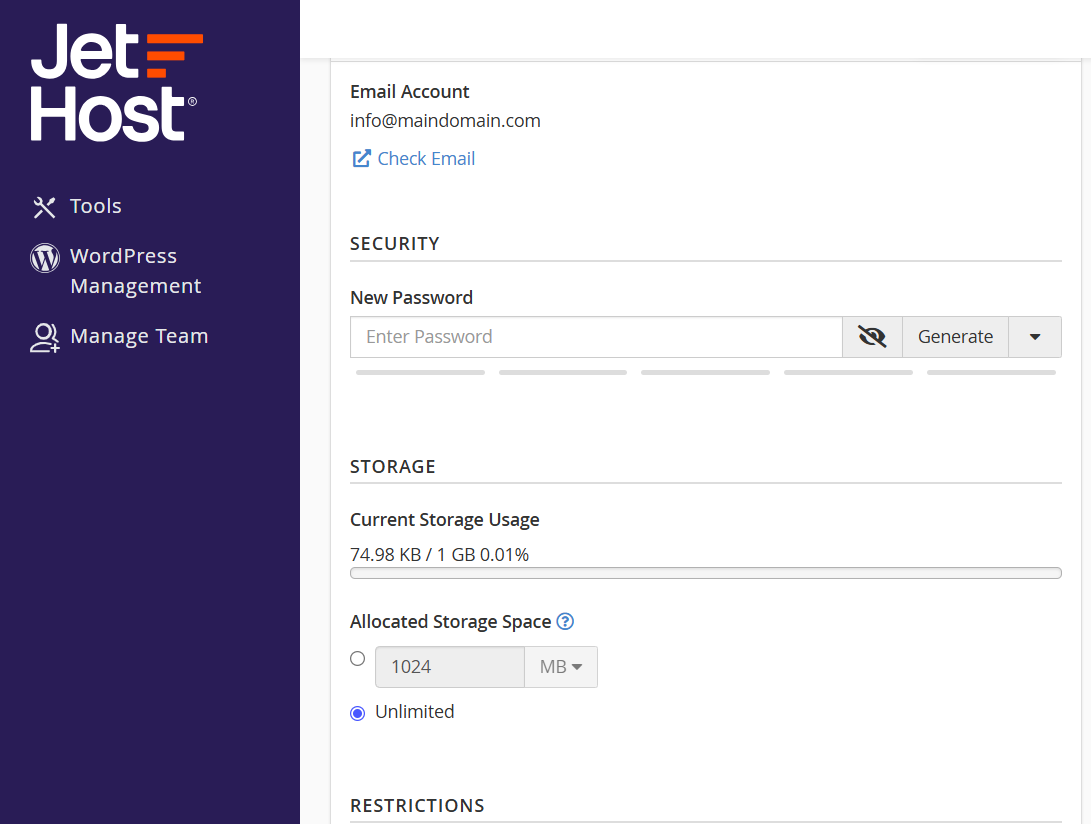
The new limit takes effect straight away, and the mailbox can start receiving mail again. You can repeat these steps for any address, and lower a quota the same way if you ever need to rein one mailbox back in.
The account space limit
One thing to keep in mind: a mailbox quota can only go as high as the free space on your hosting account. Setting a mailbox to 10 GB doesn’t help if the account only has 2 GB left. “Unlimited” works the same way – it means “up to the account’s available space”, not truly without limit. So if your plan is close to full, raising one mailbox may just move the problem somewhere else.
Free up space first
Before raising a quota, it’s often worth clearing out old mail. Use the Email Disk Usage tool to see which folders are using the most space and to delete old or oversized messages. Emptying Trash and Spam usually frees a surprising amount. This keeps both the mailbox and the whole account lean, and may mean you don’t need a bigger quota at all.
JetHost Experts Tip
If your whole account is close to full, raising a mailbox quota won’t give you more total space – you’ll need to free some up or move to a larger plan. Not sure which applies? Open a ticket and we’ll check your usage and recommend the best option.
Related: How to create an email account in cPanel, Set up email on your device, Your webmail dashboard.
Need more help?
Still short on space after raising the quota? Open a ticket through Client Area → Support and our team will help you find more room or pick a bigger plan.













