



Default Address (catch-all)
The default address (also called the catch-all) decides what happens to email sent to an address on your domain that doesn’t exist – a typo like sles@yourdomain.com, for example. This guide shows how to set it and why “discard” is usually best. Email comes with every JetHost web hosting plan.
What the default address does
When someone emails an address at your domain that has no mailbox, the server needs to know what to do with it. The default email address sets that behaviour for the whole domain. There are two sensible choices: quietly discard the message, or send it all to one mailbox.
Set your default address
- In your hosting panel, open Default Address.
- Select your domain.
- Choose Discard with an error to the sender, or Forward to a specific email address and enter one.
- Click Change to save.
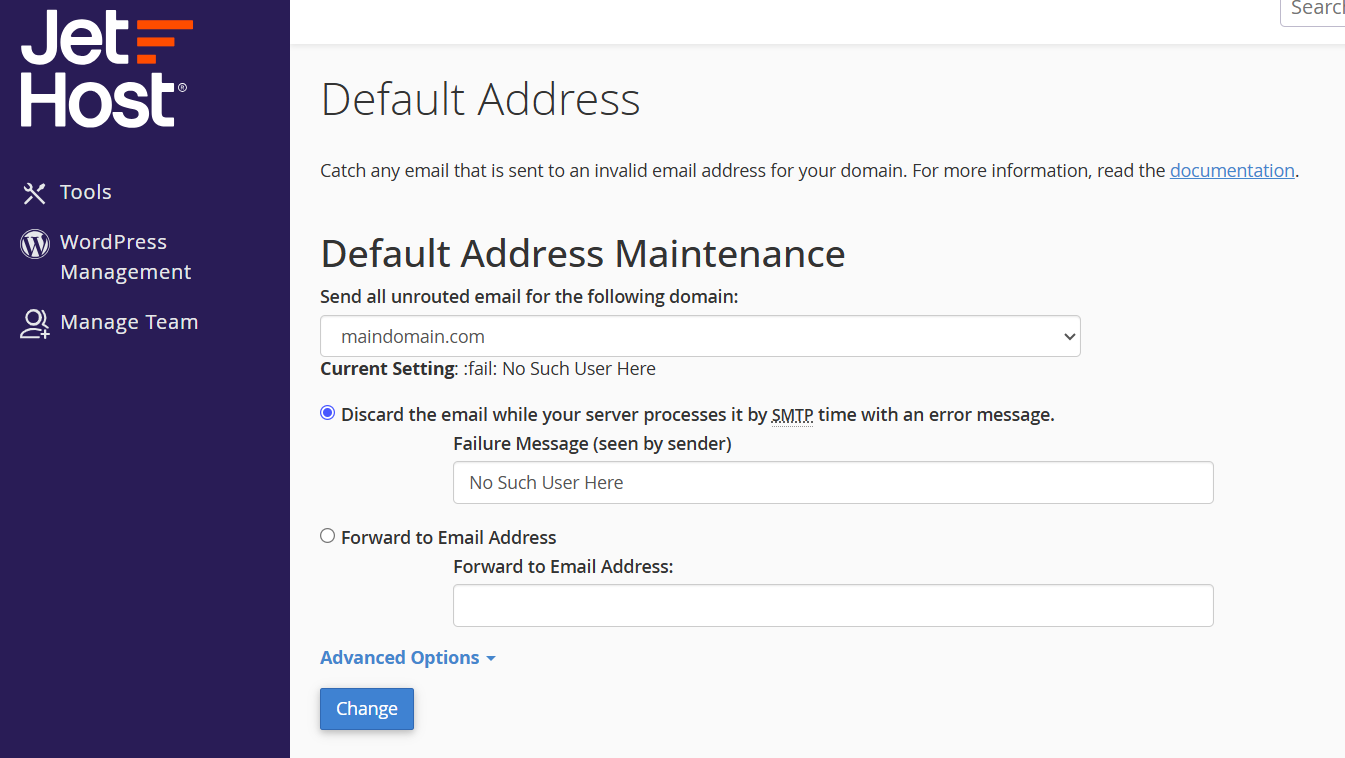
Which should you choose?
For most people, Discard is the right choice. A catch-all that forwards everything quickly fills up with spam, because spammers guess random addresses at your domain. Discarding also politely tells a real sender that they got the address wrong, so they can correct it.
Only forward the catch-all to a mailbox if you have a specific reason – and be ready to filter the spam that comes with it.
Default address vs. forwarders
The default email address is a safety net for addresses you never created. It is not the tool for sending a known address to another inbox – for that, use a normal forwarder instead. Forwarders route one specific address, so they stay clean and predictable, while the default address catches everything else. In practice, most domains create the mailboxes and forwarders they actually need, then leave the default address on Discard to soak up the rest.
JetHost Experts Tip
If you want to catch genuine typos without the spam flood, create the few real addresses people actually mistype (like info@ and sales@) as proper mailboxes, and keep the default address on Discard.
Related: Email routing, Email spam filters, Your webmail dashboard.
Need more help?
Getting a flood of mail to random addresses? Open a ticket through Client Area → Support and our team will help you set the default address.













